How to open a GPX file on iPhone (and Android) — free, step by step
To open a GPX file on iPhone: save it in Files, tap Share and choose NomadTracks. On Android: download the file, then open NomadTracks and import it from the Tracks library. You can view the route and its elevation profile without an account or subscription.
Try the workflow with a sample GPX from the Tugela Falls track. It is a user-shared recorded route; see the route page for context before using it outdoors.
Get NomadTracks free — iOS & Android
Get the file onto your device
Download the GPX and save it in Files on iPhone or Downloads on Android. If it is in cloud storage, download the actual file first. On iPhone you can also receive it through AirDrop.
Share it to NomadTracks
Tap the file and choose Share → NomadTracks (or open it from the Files app). Alternatively, open NomadTracks and use Import in the Tracks or POIs tab to browse for the file.
Review what gets imported
NomadTracks shows what's inside: tracks, routes and waypoints. Waypoints become POIs with their names, descriptions and coordinates preserved; tracks keep their timestamps and elevation profile when present.
Organize into folders
Imported items land in your library like any recording. Move them into folders, recolor tracks so imports are visually distinct, and enable a supported sync provider if you want them on your other devices.
Export anytime
Select any track or POI (or a whole folder) and choose Export — as GPX, GeoJSON, or a NomadTracks bundle that includes photos and metadata. Share via AirDrop, Mail, Messages or iCloud Drive.
What is actually inside a GPX file
GPX (GPS Exchange Format) is plain XML, and almost every import surprise comes down to which of its three kinds of content a given file carries:
- Tracks (
trk) — an ordered breadcrumb of recorded points. This is what a recording produces, and the only one that can carry timestamps and elevation. - Routes (
rte) — a planned sequence of turn points, produced by planners rather than recorders. No timestamps, and usually far fewer points. - Waypoints (
wpt) — single named places: a trailhead, a spring, a geocache, a parking spot. They can appear on their own or alongside a track.
So a file that imports as a handful of pins and no line is not broken — it simply contains waypoints and no track. A file that shows a line but a flat elevation profile was recorded without elevation, or planned rather than recorded. Both the ele (elevation) and time fields are optional in the format, and plenty of tour portals strip them before handing you the download.
If the file will not open
- The browser shows the file as text. GPX is XML, so a browser handed one directly will often render the markup instead of downloading it. Long-press the download link and choose Download Linked File rather than tapping it.
- It arrived as a .zip. Tour portals routinely wrap downloads. Tap the zip in Files (iPhone) or your file manager (Android) to unpack it first — the GPX is inside.
- NomadTracks is not in the share sheet. Scroll the app row to the end and tap More; the app can be enabled and pinned there. Importing from inside the app always works too, and avoids the share sheet entirely.
- The extension is .fit, .tcx or .kml. Those are not GPX. FIT and TCX come off Garmin and other watches, KML from Google tools — all convert to GPX with free desktop tools, and the Strava and Garmin import guide walks through it.
- Cloud storage hands over a link, not a file. Download the actual file to the device first; a placeholder that still lives in the cloud has nothing to import.
Opening a GPX on Android
The steps above are the same, with one difference worth knowing: Android download managers sometimes rename a GPX to .gpx.txt or drop it in a per-browser download folder that other apps cannot see. If the file does not show up when browsing for it, rename it back to .gpx and move it to the shared Downloads folder. Importing from inside NomadTracks — Tracks tab, then Import — then finds it reliably.
Nothing here needs an account, and the file is read on the device: importing a GPX does not upload it anywhere.
Just looking, or keeping it?
If all you want is a quick look at somebody else's file — how long is it, how much climbing, where does it actually go — you do not need to install anything. The free GPX viewer opens the file straight in the browser, on a phone as well as a desktop, and the file never leaves the device.
Importing is the right move when you want to use the track: keep it in a library, take it offline where there is no signal, follow it with your live position on the line, or export it again later. That is the difference between reading a map and carrying one.
Getting to the trailhead with Apple Maps
Apple Maps and the Google Maps app cannot import GPX files at all — there is no import function and nothing useful to convert to. The practical pattern is to keep the track in a GPS app and hand Apple Maps a single point when you want driving directions to the start. GPX and Apple Maps covers that handoff, and why the limitation is not something an app can work around.
Android import and export menus
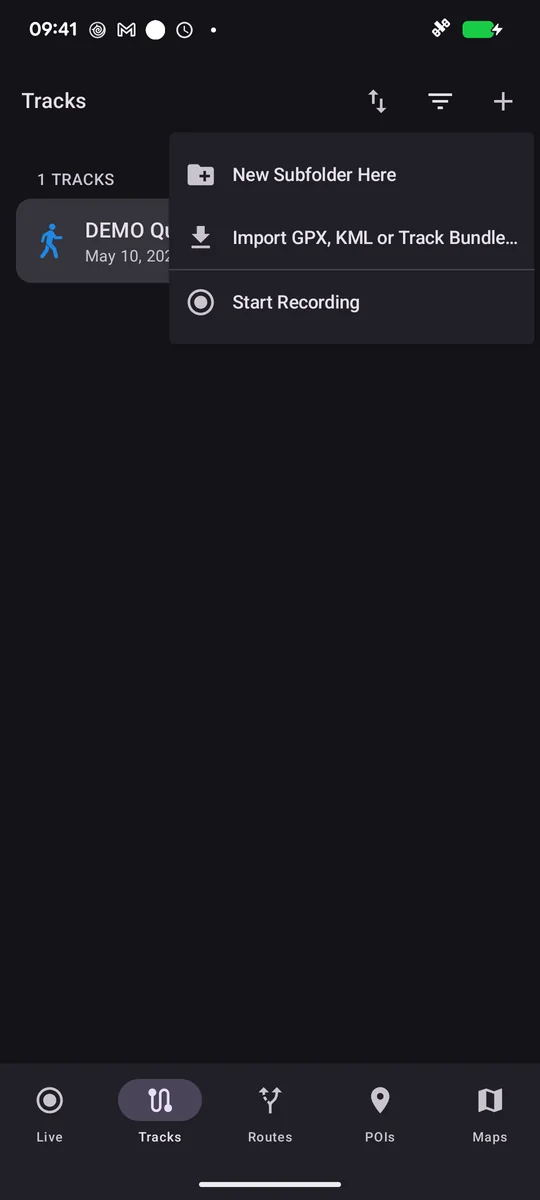
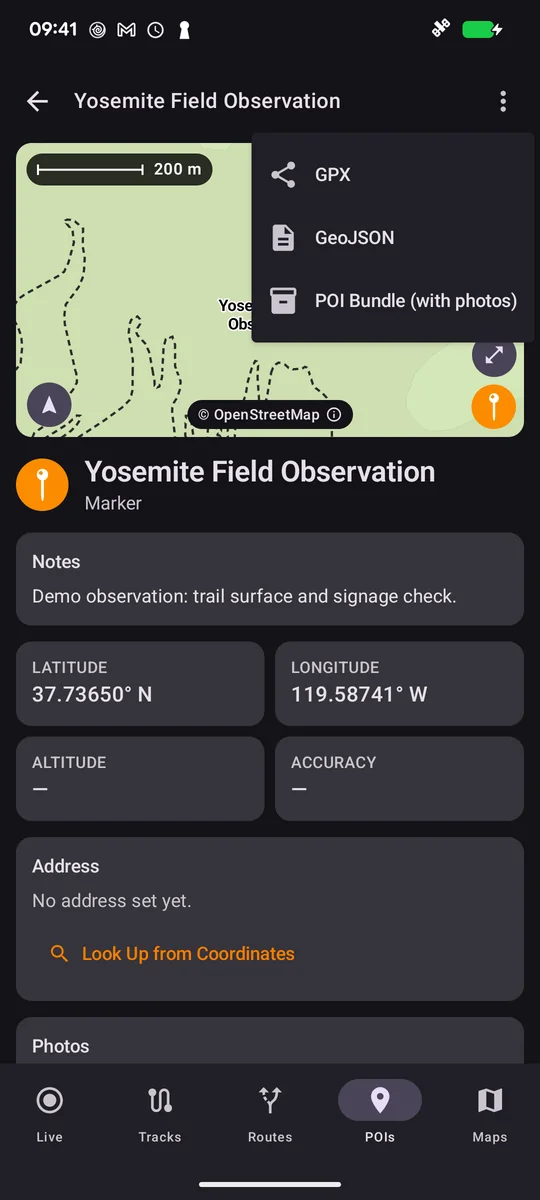
Open the Tracks menu to import a GPX, KML or Track Bundle. The screenshots show the available commands; the POI export menu offers GPX, GeoJSON and a bundle with photos.
FAQ
How do I open a GPX file on my iPhone?
Save it in Files, tap it, and choose Share → NomadTracks — or open NomadTracks and use Import in the Tracks tab. The route, its elevation profile and any waypoints appear immediately. No account and no subscription are involved.
Can I open a GPX file without installing an app?
Yes. The GPX viewer opens the file in a browser and shows the route, distance, elevation profile and waypoints. It is the faster option when you only want to look at a file. Installing an app pays off when you want to keep the track, use it offline or follow it outdoors.
Can Apple Maps open a GPX file?
No. Apple Maps has no GPX import on iPhone, iPad or Mac, and the same is true of the Google Maps app. Google My Maps in a desktop browser can import GPX into a custom layer, but the result is a map to look at rather than a track to navigate. See GPX and Apple Maps.
Why does my imported track show no elevation profile?
Because the file carries no elevation data. The ele field is optional in GPX, and planned routes and portal exports frequently omit it. Nothing was lost in the import — it was never in the file.
Is opening and importing GPX files free?
Yes, and unlimited. Import and export of GPX and GeoJSON are free in NomadTracks for good; there is no cap on how many files you bring in and no account to create.
Does importing a GPX upload it to a server?
No. The file is read on your device and stays in your own library. If you enable a sync provider it moves through your own iCloud account — never through NomadTracks servers.
What is the difference between a track, a route and a waypoint?
A track is a recorded breadcrumb trail of where someone actually went, with timestamps and elevation where available. A route is a planned sequence of turn points. A waypoint is a single named place. One GPX file can contain any combination of the three.